Remember, the best way to protect yourself from injury during an earthquake is to Drop, Cover, and Hold On. This is a great time to review and practice.
Update to the Historical Earthquake Data feed
In this update, we added a new USGS 2-year North America M4.5+ option to the Historical Data feed. This will enable you to view smaller earthquakes from the recent past, such as the 2024 New Jersey earthquake which happened one year ago today.
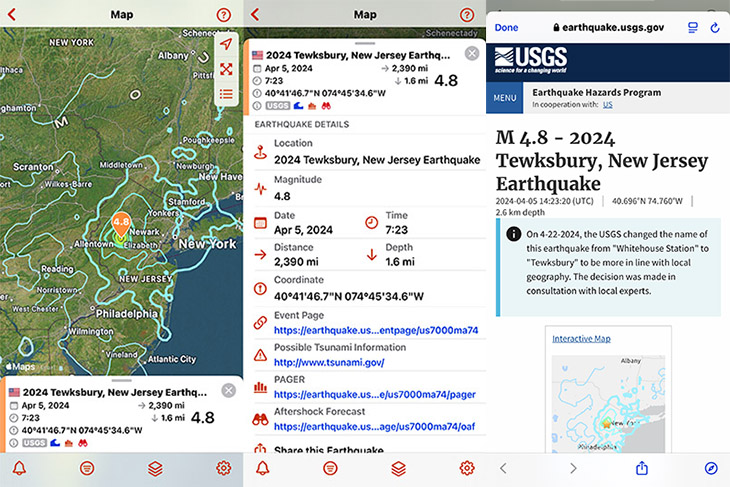
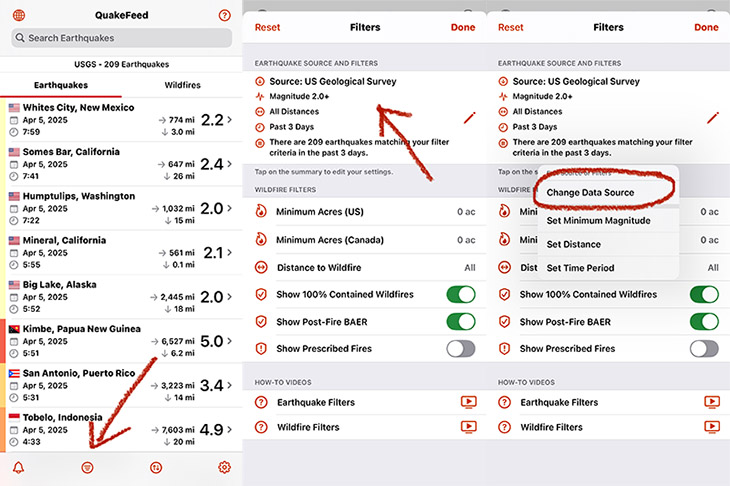
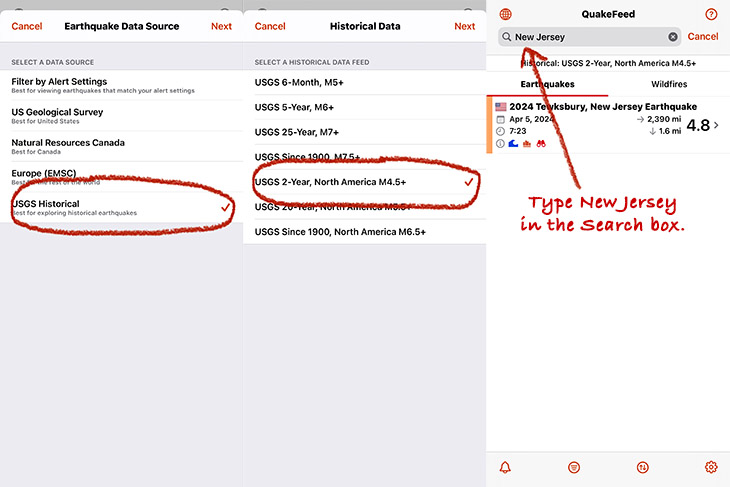
To access the historical earthquake data in QuakeFeed and view the 2024 New Jersey earthquake, tap where indicated by the arrows and circles in the images below, then type New Jersey in the search box at the top of the list.
Substack News Page
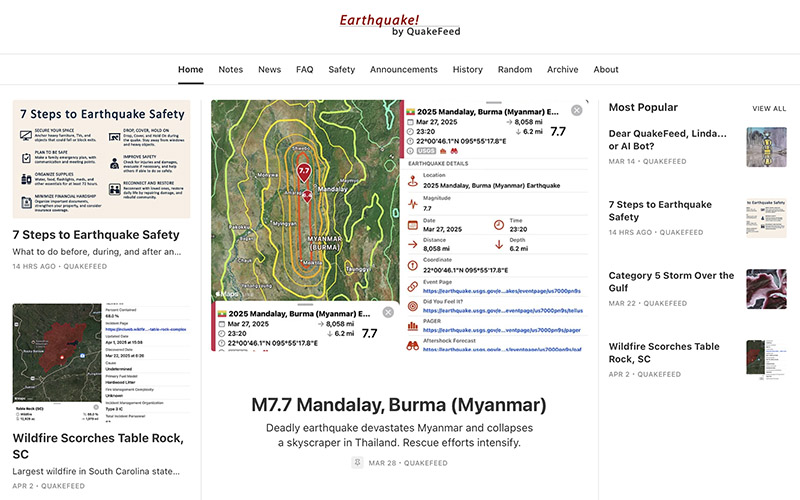
We are publishing on Substack! Our Substack is free and no subscription is required. We’ll post earthquake and wildfire news, along with answers to FAQs, safety tips, and product annoucements. In future updates, we will integrate this news feature into different parts of the QuakeFeed app.
Burned Area Emergency Response (BAER)
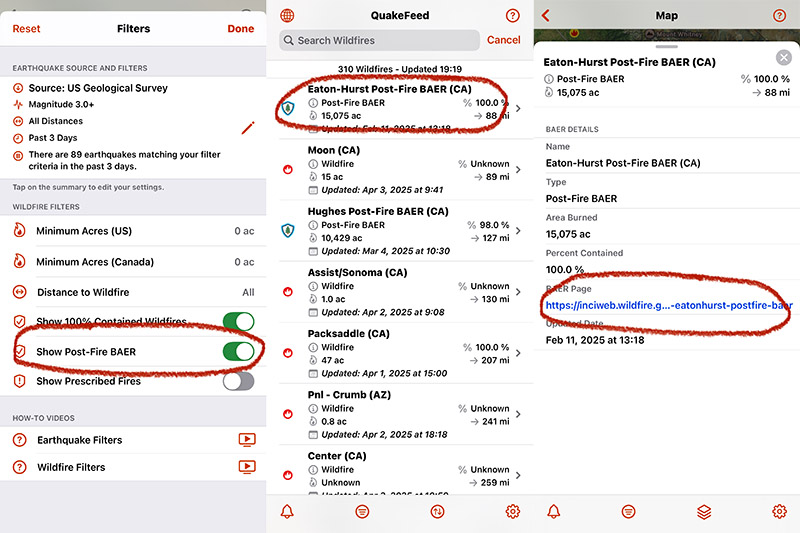
In the months after a major wildfire has been contained, there may be ongoing information posted on the Burned Area Emergency Response (BAER) page on Inciweb. We thought it would be helpful and important to include this information in QuakeFeed, so we added Post-Fire BAER to the wildfire list and map. The Show Post-Fire BAER setting is turned on by default, and the BAER details screen includes a link to the BAER page on Inciweb.
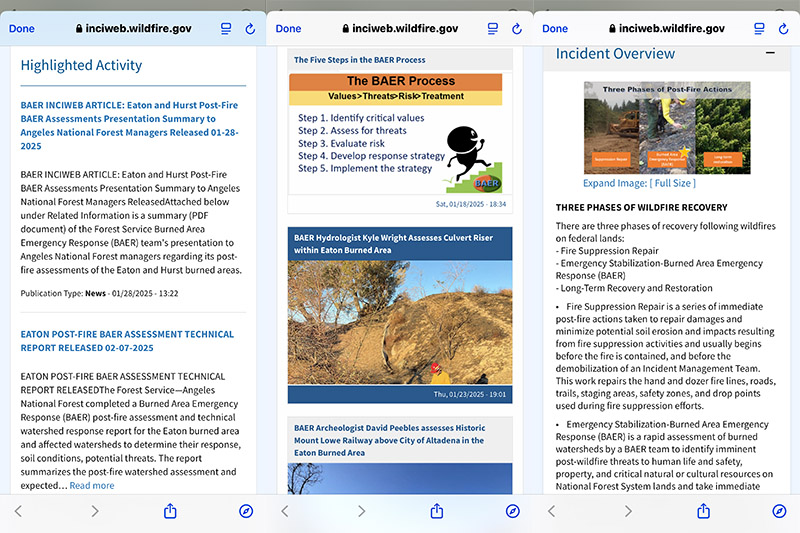
The BAER page includes assessment reports, maps and photographs of the burned area, and information about wildfire recovery.
PLEASE RELY on your county and / or your local fire agency for emergency alerts and safety information. QuakeFeed is for education and learning only.
The Historical Earthquake and Wildfire features requires a QuakeFeed Premium subscription, which you can try for free for 30 days.
New Dark Mode and Tinted Icons
This update includes a new QuakeFeed icon for Dark Mode. When you have your device in Dark Mode, the icon now has a dark background.
And for you super geeks out there who love Tinted Mode, we have a QuakeFeed icon for that as well. Tinted Mode is a feature in iOS that lets you change the color of all your icons at once. To enable Tinted Mode:
- Long press an empty space on your Home Screen.
- Tap Edit in the top-right corner.
- Tap Customize.
- Select the Tinted option.
- Adjust the sliders to change the tint.
- Tap anywhere outside of the Customize panel to finish
REMINDER ABOUT THE PLATE LINES AND FAULTS MAP LAYERS…
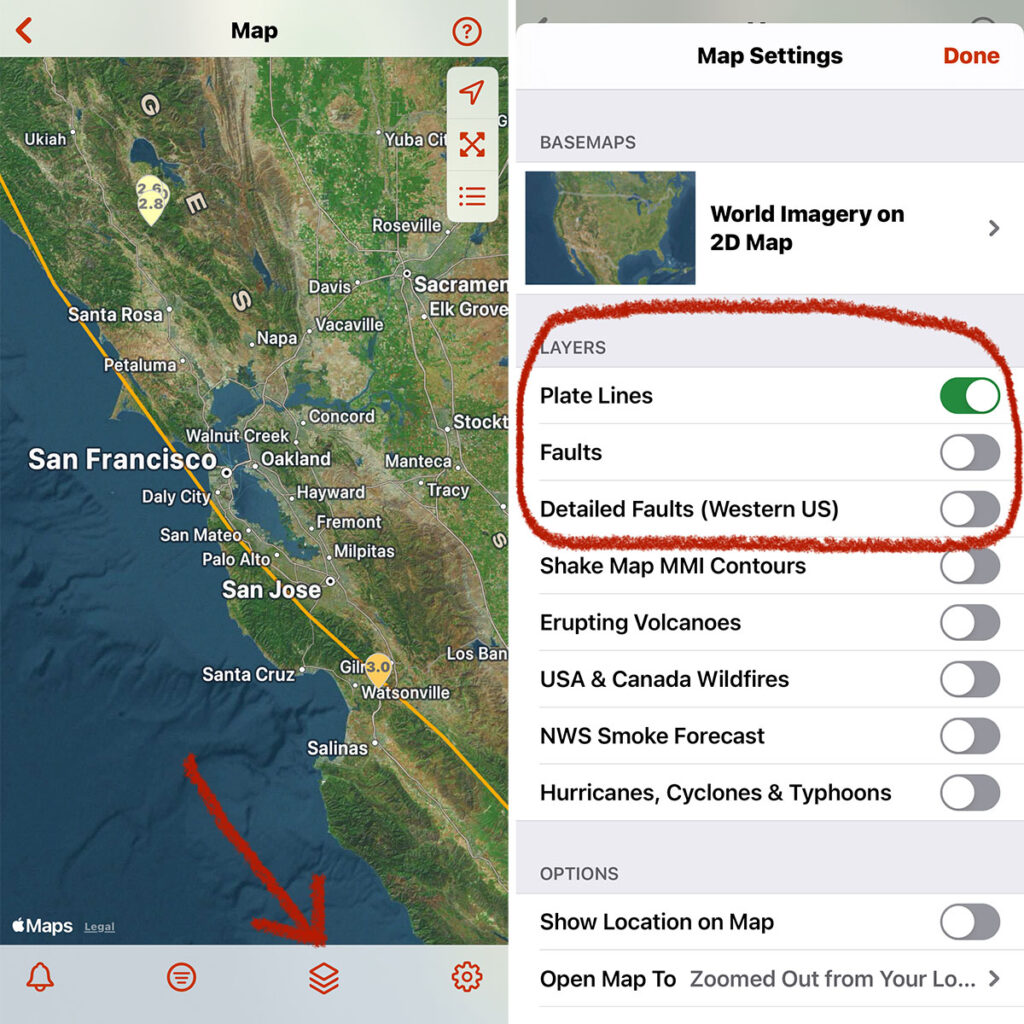
To improve the speed of the map, we adjusted the default settings so that the faults layers are turned off. If you would like to turn on the Faults and/or Detailed Faults map layers, tap the third button in the bottom row of buttons.
PLEASE NOTE:
- The Detailed Faults map layer covers only the USA west of the Rockies, is only displayed when an earthquake is selected, and only includes faults in the vicinity of the selected earthquake.
- The Faults map layer includes faults from the USA plus other parts of the world.
We encourage you to be curious and experiment with both of these map layers and learn more about faults. Please let us know if you have any questions or you notice any problems. Tap the ? in the top right corner of QuakeFeed then tap Ask to send us a support email.
New Icons
This update includes a new QuakeFeed icon for Dark Mode. When you have your device in Dark Mode, the icon now has a dark background.
And for you geeks out there who love Tinted Mode, the QuakeFeed icon that supports that as well. Tinted Mode in iOS that lets you change all your icons to the same color. To enable Tinted Mode:
- Long press an empty space on your Home Screen.
- Tap Edit in the top-right corner.
- Tap Customize.
- Select the Tinted option.
- Adjust the sliders to change the tint.
- Tap anywhere outside of the Customize panel to finish.
Free 30-Day Trial
QuakeFeed Premium is FREE for 30-days for new subscribers. Includes wildfires, smoke forecast, tropical storms, historical earthquakes, and more.
- Tap the Settings button (bottom right corner).
- Tap the blue Redeem Your Free Month button.
Family Sharing
Share your QuakeFeed Premium subscription with up to five family members!
- How to set up Family Sharing in iOS (https://support.apple.com/en-us/HT201088)
- How to Share Purchases with your Family (https://support.apple.com/en-us/HT201079)
Feedback
If you have questions or notice any problems, please tap the ? in the top right corner, then tap Ask to send us a support request.
Please rate and review QuakeFeed in the App Store to help others find us. Thank you, and we hope you and your family stay safe!